Web Services Deep Dive

1. SOAP-Based Services
Content-Type: text/xml. The request body contains the actual SOAP message wrapped
in XML. The server processes this and returns a response, also wrapped in another SOAP XML
envelope.
PROTOCOL: SOAP
Simple Object Access Protocol: A messaging protocol that defines rigid structures for exchange. It includes built-in features like WS-Security for enterprise-level communication.
FORMAT: XML
eXtensible Markup Language: The encoding format for SOAP. Every message includes a Header (security, routing) and a Body (the actual payload/method data).
TRANSPORT LAYER
| Protocol | Characteristics |
|---|---|
| TCP | Connection-oriented, reliable, error-checked. Used by HTTP, SMTP, and SSH. |
| UDP | Connectionless, faster, no delivery guarantee. Used for streaming or speed-critical tasks. |
The SOAP Contract: WSDL
?wsdl URL (e.g.,
http://example.com/service?wsdl). Tools like wsdl.exe read this file
to generate proxy classes, allowing the developer to call remote methods as if
they were local code.
Enterprise Security (WS*-Security)
Unlike REST, which relies on transport-level security (HTTPS), SOAP provides Message-Level Security.
Digital Signatures
Ensures Integrity & Authenticity. The sender signs the message with a Private Key; the recipient verifies it with the sender's Public Key.
Encryption
Ensures Confidentiality. The sender encrypts the message using the recipient's Public Key. Only the recipient's Private Key can unlock it.
2. RESTful Services (HTTP Methods)
REST relies entirely on standard HTTP verbs to perform actions on resources.
| METHOD | ACTION | EXAMPLE USE CASE |
|---|---|---|
| GET | Retrieve Data | Fetching a list of users or a specific profile. |
| POST | Create Data | Submitting a form to register a new user. |
| PUT | Update Data | Replacing an existing user's entire profile. |
| DELETE | Remove Data | Deleting a user record from the database. |
HTTPS: Hypertext transform protocol secure is a secure version of HTTP, it use SSL/TLS (secure socket layer/ transport layer security) encryption to protect sensitive data (like payment details) is sending between client and server.
Examples:
//SOAP
<soap:Envelope xmlns:soap=""> //begining and end of soap
                        <soap:Header>   //contain additional info like security, routing
                        </soap:Header>
                        <soap:Body> //actual data in here
                            <GetUserDetails>
                                <UserId>123</UserId>
                            </GetUserDetails>
                        </soap:Body>
                        </soap:Envelope>
<person>
                        <name>Firuza Polad</name>
                        <age>28</age>
                        <isEmployed>true</isEmployed>
                        </person>
<message name="GetWeatherRequest"> //Describes the messages used (input/output).
                            <part name="city" type="xsd:string" />
                        </message>

                        <portType name="WeatherPortType">  // Defines the operations (methods) the service supports.
                            <operation name="<binding name="WeatherBinding" type="tns:WeatherPortType">">
                            <input message="tns:GetWeatherRequest"/>
                            <output message="tns:GetWeatherResponse"/>
                            </operation>
                        </portType>

                        <binding name="WeatherBinding" type="tns:WeatherPortType">  //Specifies how the service is accessed (usually over HTTP).
                        ..
                        </binding>

                        <service name="WeatherService"> //Contains the service endpoint information.
                        ..
                        </service>
2. RESTfull based services:
over a time, web service also include RESTfull services, this service use standart HTTP methods and REST architecture style to perform operation and return json/xml as response. Restfull web service is considered an API.
- REST: representational state transfer, is an architecture style that use standart HTTP methods to perform operation. It relies on HTTPS for security, stateless (each request from the client to the server must contain all information necessary to understand and process that request, the server does not store session information between different request), meaning each request from client must contain all necessary information to complete the request. Are lightweight, easy to implement, return data in format like JSON,XML,HTML etc. Usage in Web/Mobile applications due its simplicity.
- JSON: JavaScript object notation, is a lightweight message format that is easy for human to read and write, for machine to parse and generate. Used for transfer data between server and web application. Commonly used in RestFull web services, AJAX, API, config file. JSON consist of key-value pairs enclosed in curly braces {}. Client application can easily parse the JSON response and display the data in the UI. And is language independent. Data can be organized as:
| Objects | Also knows as dictionaries or maps and represented by key and value pair. |
|---|---|
| Arrays | List of values, typically enclosed with brackets []. |
| Parsing JSON | Converting a JSON string into a data structure(like object) |
|---|---|
| Serializing JSON | Converting a data structure into a JSON string for transmission or storage. |
{
    "name": "Firuza Polad",
    "age": 28,
    "isEmployed": true,
    "skills": ["JavaScript", "HTML", "CSS"], // ARRAY
    "address": {  // OBJECT
        "street": "123 Main St",
        "city": "BAKU",
        "zip": "10001"
    }
}const jsonString = '{"name": "Firuza ", "age": 28}';
const obj = JSON.parse(jsonString);
console.log(obj.name); // Output: Firuzaconst obj = { name: "Firuza ", age: 28};
const jsonString = JSON.stringify(obj);
console.log(jsonString); // Output: '{"name":"Firuza","age":28}'- JSON vs XML: Both formats are used for data exchange, but JSON is more popular in nowadays as we use fewer characters, structure is simpler which enable it to read and write manually, faster than XML. Ideal for mobile and web applications.
WCF (Windows Communication Foundation)
There are 3 parts of WCF applications:
-
WCF Service: core part of application, define BS logic and could be
anything like calculating data, retrieving information from DB, process order. It
has:
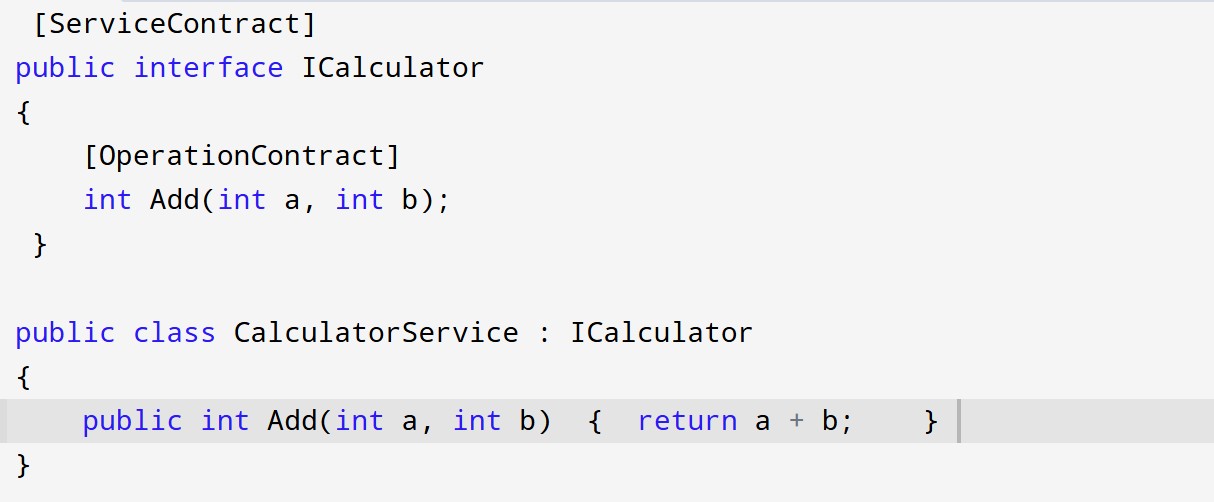
- Service contract: Specifies what operation are provided to clients
- Data contract: Specifies data structure that are exchanged between the service and client. -
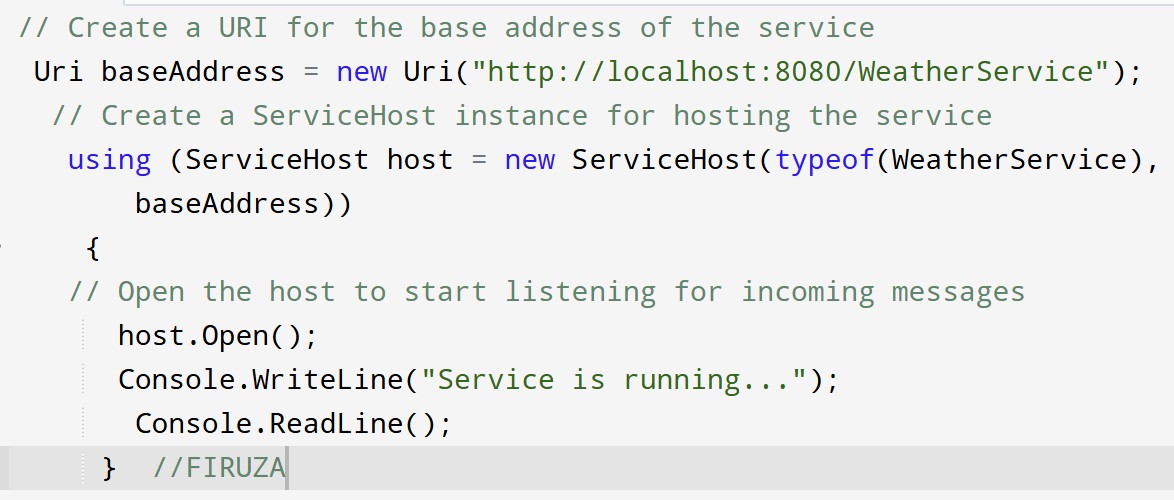
WCF Service Host: is responsible for hosting the WCF service, like
listening for incoming request, managing lifetime, provide necessary binding.
Withous a Host, the service can not be accessed, it can be hosted such as:
- IIS (internet information service) which means service runs inside IIS as As application;
- Self-Hosting which means we can host service inside console application etc.;
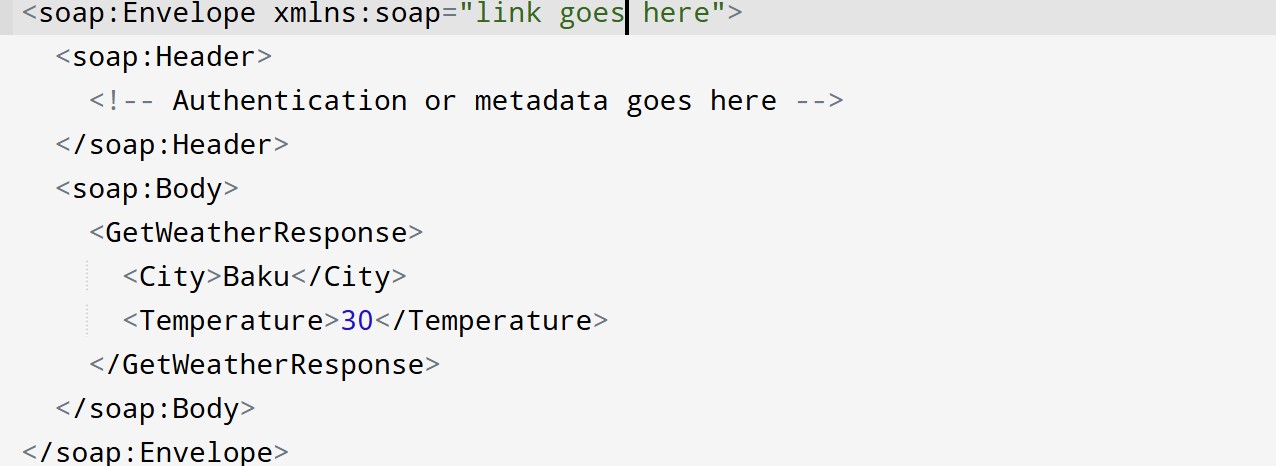
- WAS (windows activation service) which means more advanced version of IIS and enable non-HTTP protocol like TCP. - Service Client: is the application or service that use the WCF service, it calls the methods from service and use them, the client can be any kind of application (web,desktop,mobile) that needs to communicate with the service. The client typically uses a proxy class generated by tools,VS which acts as an intermediary to call service methods. Example: Calling GetWeather() method from proxy class which is use WeatherService (see below)
Fundamentals of WCF:
Message: WCF use SOAP message (XML based) for communication by default. Message contain Header (for authentication) and Body (for actual data).EndPoint: Is a communication between client and service. Is the access point where WCF provide its functionality to clients, like an address where client can send request to service. Each service has at least 1 endpoint but can have multiple for different protocols. It has 3 important parts (ABC):
| Address | location where service is hosted, like URL (http://localhost:8080/WeatherService) |
|---|---|
| Binding | define how communication happens between client and service, like protocols (HTTP,TCP), endpoint(text,data) |
| Contract | define interface what operations are provided by service, like methods available to clients. There are 2 type of contract (service and data, read above). |
~ When to use WCF:
Suppose we have 2 clients: One of them wants to use WebService which sends data over the network by using HTTP protocol and want reply in XML formati (HTTP + XML e.g., SOAP/REST over HTTP), the other client wants to use WebService which sends data over the network by using TCP protocol and replying in binary format (TCP + Binary).
The problem in here is, we need to create 2 different Services for 2 different clients.
WCF is solving this problem writing one single service which can be used by 2 different
clients-either they want same protocol or a different protocol ex:
basicHttpBinding → for HTTP + XML or netTcpBinding → for TCP + Binary. We
don’t define the protocol name inside the WebService class itself, instead we configure
it in the WCF configuration (app.config/web.config) under the
<endpoint> element.
Without WCF we can create simpler,lighweight approach SOAP based service which can use ASMX. In application we choose ASP.NET Web Application (ASMX) template. But WCF offering more features like WS-* standarts, reliable messaging and more, so if need full SOAP features we use WCF on .NET framework. It only runs on Windows as part of .NET framework. In application we choose WCF Service Application app from template.
If we need SOAP on cross-platform (Windows,Linux, MacOS) but limited features we use SoapCore library as WCF not supported on .NET Core (now .NET5/6/7/8). SoapCore is not typically used for client-side, is mainly used for server-side. If we want to build a client-side service we use ServiceModel.Http library, it allow the client-side functionality of WCF in .Net Core but itself does not support server-side.
Key terms:
- ServiceContract: Interface define service's operation, using
[ServiceContract]and[OperationContract]attributes - DataContract: Class define data structure used by service using
[DataContract]and[DataMember]attributes

| WCF | WebService (ASMX) |
|---|---|
| ServiceContract and OperationContract used for defining WCF service | WebService and WebMethod used for defining web service |
| Support HTTP(S), TCP protocol | Support only HTTP(S) |
| Hosted on IIS, WAS or Self containing hosting | Hosted only IIS |
| Use tool to generate proxy classes | Use tool to generate proxy classes |
| Use System.Runtime.Serialization | Use System.Xml.Serialization |
API
application programming interface, is set of rules and protocols that define how different software app can interact with each other. It doesn’t have to involve the Web. It has 2 types, such as local APIs (e.g., a C# class library) or remote APIs (e.g., REST APIs or SOAP APIs).
Local API (No Internet) means: we're writing a C# desktop app to manipulate files. We use the .NET File API provided by the framework to perform tasks ( using the File and Directory classes and streams FileStream, StreamReader, StreamWriter ) like reading, writing, or deleting files.
WEB API: is type of Remote API allow different applications communicate with each other over WEB, using HTTP(S) as protocol. Commonly used to enable web app, mobile app and other system to interact with external services and exchange data. RESTful APIs (which use JSON or XML over HTTP) and GraphQL APIs are types of Web APIs. ASP.NET Web API (or just Web API) Used to build RESTful services.
Characteristics
- Uses standard HTTP methods like GET, POST, PUT, DELETE.
- Stateless: each request must contain all necessary information. The server does not store session information between requests.
- Typically exchanges data in JSON or XML.
- Enables communication between systems built on different technologies (e.g., one Web API built in JavaScript, another in .NET).
- Reusable across multiple platforms (web, mobile, desktop).
Usage
- Many services offer public APIs to allow developers to integrate (e.g., payment gateways, social media platforms).
- Mobile apps commonly use Web APIs to communicate with backend servers for retrieving data and performing actions (e.g., user authentication).
- In microservices architecture, Web APIs are used to allow different services to communicate with each other.
- Cloud services expose functionality via Web APIs, enabling developers to access features like data storage.
How works: Client using application (web, mobile) to request to webAPI, this request typically follow a URL structure and include any necessary parameters (query string, request body). Server hosting API request, interact with , perform operation and return response back to client, usually in JSON/XML formats. And client process and display this format response.
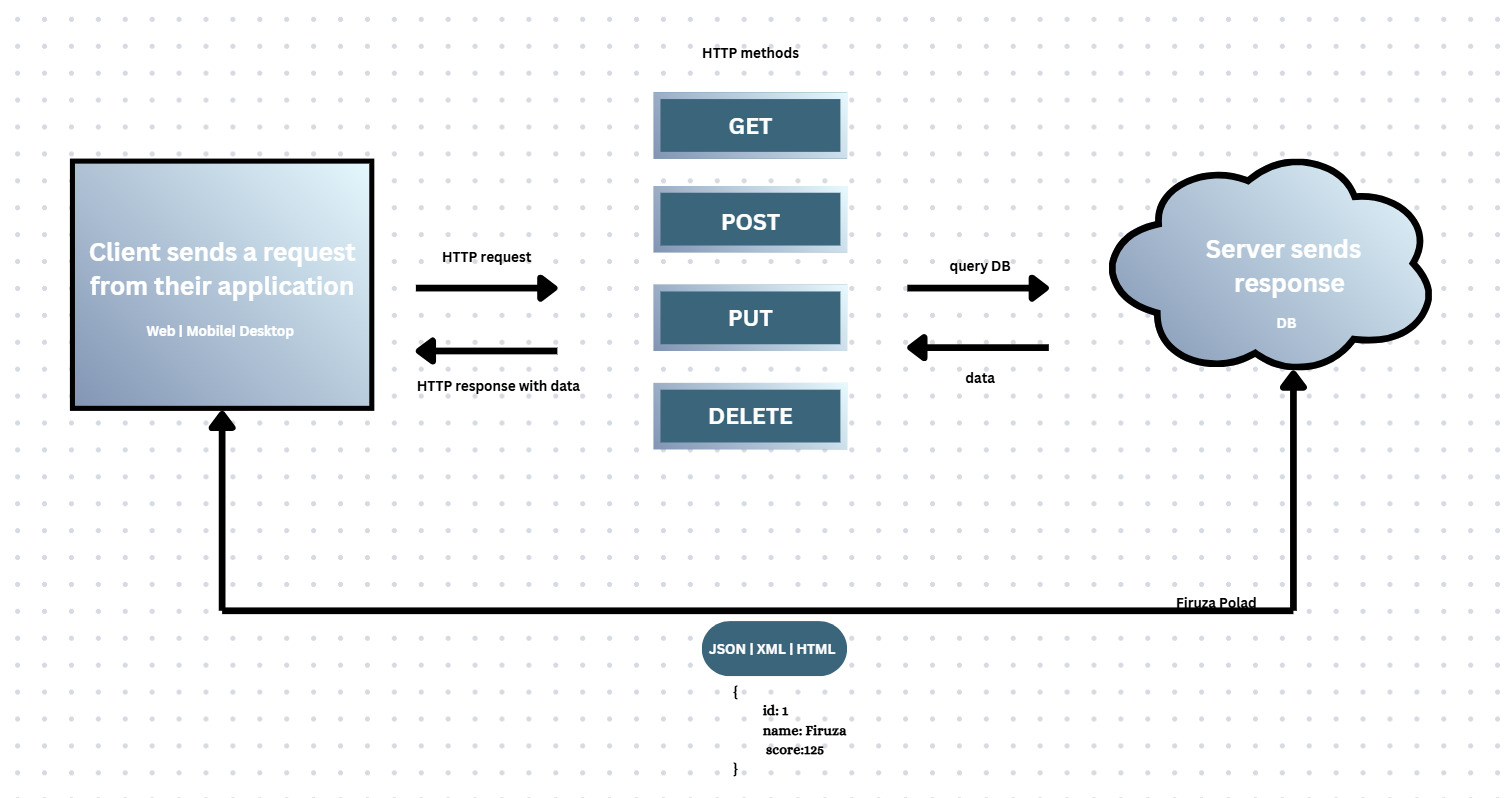
GET, POST, PUT, and DELETE in RESTful API Design
API vs WebService
Key Distinction: Both are designed for communication over the web. All Web Services are Web APIs, but not all Web APIs are Web Services.
| Web Service | Web API |
|---|---|
| Is a specific type of Web API. Older, traditionally using SOAP (XML). Example: Bank A sending transactions to Bank B needing strong security. Uses complex XML structures with headers/body/tokens. Web services are stateless. | Includes all types: REST, SOAP, GraphQL. Modern approach. Example: Mobile app getting weather data via HTTP GET to a RESTful API and receiving simple JSON. Perfect for real-time updates. |
HTTP Headers: Accept & Content-Type
These define the format of data exchanged between client and server.
-
Accept Header: Tells the server what the client expects in
the response (e.g.,
application/json,application/xml). - Content-Type: Tells the server what the format of the data is in the request body (e.g., during a POST).
POST /api/users HTTP/1.1
Content-Type: application/json

{
  "name": "FS",
  "email": "firuza@example.com"
}
Web API Return Types & Status Codes
- void: Returns nothing (common for DELETE).
- HttpResponseMessage: Direct control over the response, including StatusCode.
| 200 OK | Request successful (GET, POST, PUT, DELETE). |
| 201 Created | Resource created successfully (POST). |
| 400 Bad Request | Invalid syntax or missing parameters. |
| 401 Unauthorized | Authentication required or failed. |
| 404 Not Found | Resource does not exist. |
| 500 Internal Error | Server-side crash/error. |
HttpClient & IHttpClientFactory
Found in System.Net.Http, HttpClient sends requests and receives
responses. Using IHttpClientFactory is best practice to manage instance lifetimes
and avoid socket exhaustion.
public class ApiService {
    private readonly IHttpClientFactory _httpClientFactory;

    public ApiService(IHttpClientFactory httpClientFactory) {
        _httpClientFactory = httpClientFactory;
    }

    public async Task<string> GetDataAsync() {
        var client = _httpClientFactory.CreateClient();
        var response = await client.GetAsync("https://api.example.com/");
        response.EnsureSuccessStatusCode();
        return await response.Content.ReadAsStringAsync();
    }
}
JSON Serialization Comparison
Web API uses different libraries to convert .NET objects to JSON:
- Newtonsoft.Json (Json.NET): Feature-rich, best for complex scenarios in older ASP.NET Web API.
- System.Text.Json: High performance, low memory, default for modern .NET Core.
- JSON.stringify(): The JavaScript equivalent used on the Client-side.
ASP.NET Web API Routing
What is it? Routing is the process of directing incoming HTTP requests to the appropriate controller action based on the request's URL and HTTP method.
-
Attribute Routing: Allows us to specify routes directly on the
controller or action using attributes.
[Route("{id:int}")]- Defines a base route with constraints (e.g., only accepting integers).
- [ApiController]: Marks the class as an API controller, enabling automatic model validation and JSON formatting.
-
[HttpGet]: Specifically handles GET requests. You can use the
Nameproperty to differentiate multiple endpoints.
Implementation Example:
[ApiController]
[Route("api/[controller]")]
public class ProductsController : ControllerBase
{
    [HttpGet("{id}")]
    public IActionResult GetById(int id) { /* ... */ }

    [HttpGet(Name="GetAll")]
    public IActionResult GetAllProducts() { /* ... */ }

    [HttpGet("search/{name}")]
    public IActionResult GetByName(string name) { /* ... */ }
}
Convention-Based Routing: An older approach defined in a central configuration file.
config.Routes.MapHttpRoute(
    name: "DefaultApi",
    routeTemplate: "api/{controller}/{id}",
    defaults: new { id = RouteParameter.Optional }
);
How to Secure ASP.NET Web API
- Authentication: Identifying who the user is (JWT, OAuth2).
- Authorization: Defining what the user can do (Roles, Policies).
- HTTPS: Encrypting data in transit using SSL/TLS.
- Validation: Preventing SQL Injection and XSS via Input Validation.
- CORS: Controlling which domains can access your API.
OpenAPI (Swagger)
OpenAPI is the standard for describing RESTful APIs. It generates a structured JSON description of your endpoints, formats, and auth methods, allowing tools like Postman or Swagger UI to interact with your API without manual documentation.
Setup:
// In Startup.cs or Program.cs
services.AddSwaggerGen();

app.UseSwagger();
app.UseSwaggerUI(c => {
    c.SwaggerEndpoint("/swagger/v1/swagger.json", "My API v1");
});
AJAX
Asynchronous JavaScript and XML is a technique to update parts of a web page without a full refresh.
- Async: The page stays functional while waiting for the server.
- Dynamic: Updates only specific elements (e.g., search results, comments).
Modern Implementation (Fetch API):
function loadData() {
    fetch('https://api.example.com/posts/1')
        .then(response => response.json())
        .then(data => {
            document.getElementById('content').innerHTML = JSON.stringify(data);
        })
        .catch(error => console.error('Error:', error));
}
Mention what is the difference between AJAX and REST?
| Feature | AJAX | REST |
|---|---|---|
| Nature | Client-Side Technique Allows a web page to send and receive data asynchronously from a server without refreshing the entire page. | Architectural Style A set of constraints and principles for designing web services and APIs. |
| Mechanism |
Uses JS to make requests via fetch() or
XMLHttpRequest().
|
Uses standard HTTP methods (GET, POST, PUT, DELETE) to interact with resources. |
| State | Can be either stateful or stateless. | Designed to be strictly stateless. |
| Use Case |
Ex: Updating search results in real-time as you
type in Google.
|
Ex: A weather service API providing data to
different apps.
|
Understanding JSON Web Tokens (JWT)
JSON Web Token (JWT) is an open standard used for securely transferring information between parties as a JSON object. While widely used for authorization and authentication, it is important to remember that JWT is not encrypted by default—the payload is visible to anyone. Encryption (JWE) should be added if sensitive data is being transferred.
Contains the token type and the signing algorithm used (e.g., HMAC SHA256).
{
  "alg": "HS256",
  "typ": "JWT"
}
Contains user data. Can be Registered (exp, sub), Public (name), or Private.
{
  "sub": "2354",
  "name": "Firuza",
  "admin": true,
  "iat": 1516239022
}
Ensures the token hasn't been tampered with by combining the encoded header, payload, and a secret key.
HMACSHA256( base64UrlEncode(header) + "." + base64UrlEncode(payload), secretKey )
Implementation & Access Tokens
In .NET, the JwtSecurityTokenHandler automatically handles the encoding
based on the SecurityTokenDescriptor. The resulting Access
Token is short-lived and sent via the Authorization header:
Tokens are stateless and typically stored in:
Local Storage Session Storage Memory// Sending the stored token
fetch('/api/protected-resource', {
headers: { 'Authorization': 'Bearer ' + localStorage.getItem('token') }
});
Advanced Authentication: Refresh Tokens, Validation, & OAuth
Lifecycle Refresh Token
A long-lived token that allows the client to obtain a new access token without re-authenticating the user. When a user logs in, the server responds with two tokens: Access and Refresh tokens. After the access token expires (typically 15 min), the client automatically sends the refresh token to get a new Access Token, keeping the user logged in without a new login prompt.
Security ValidateToken & Parameters
The process of checking if a token is valid by verifying its signature,
expiration, and claims. We use ClaimsPrincipal to
extract data like IDs or Roles for authorization.
TokenValidationParameters define the rules:
- ValidIssuer: Ensures the token was created by a trusted authority.
- ValidAudience: Specifies who the token is intended for.
- IssuerSigningKey: The secret key used to verify the signature.
- ClockSkew: A grace period for expiration (e.g., 5 mins).
ValidIssuer = "https://auth.yourapp.com";
IssuerSigningKey = new SymmetricSecurityKey(key);
ValidateIssuerSigningKey = true;
ClockSkew = TimeSpan.FromMinutes(5);
RequireExpirationTime = true;
Data Encoding & Base64
Process JWT Workflow & JWE
1. User logs in → 2. Server generates JWT → 3. Client stores in
LocalStorage/Cookie → 4. Client sends JWT in Authorization: Bearer
header → 5. Server validates signature.
| Advantages | Disadvantages |
|---|---|
| Stateless (no DB session lookup needed), ideal for Microservices, efficient transfer. | Not encrypted by default. If sensitive, use JWE (JSON Web Encryption) via RSA keys. |
Comparison Session-Based vs. Stateless JWT
SessionID in cookies. Full server control. Better for
traditional apps.
Protocol OAuth (Limited Access)
A protocol allowing one app to access resources (like Google Calendar) without your password. It uses tokens for limited permission.