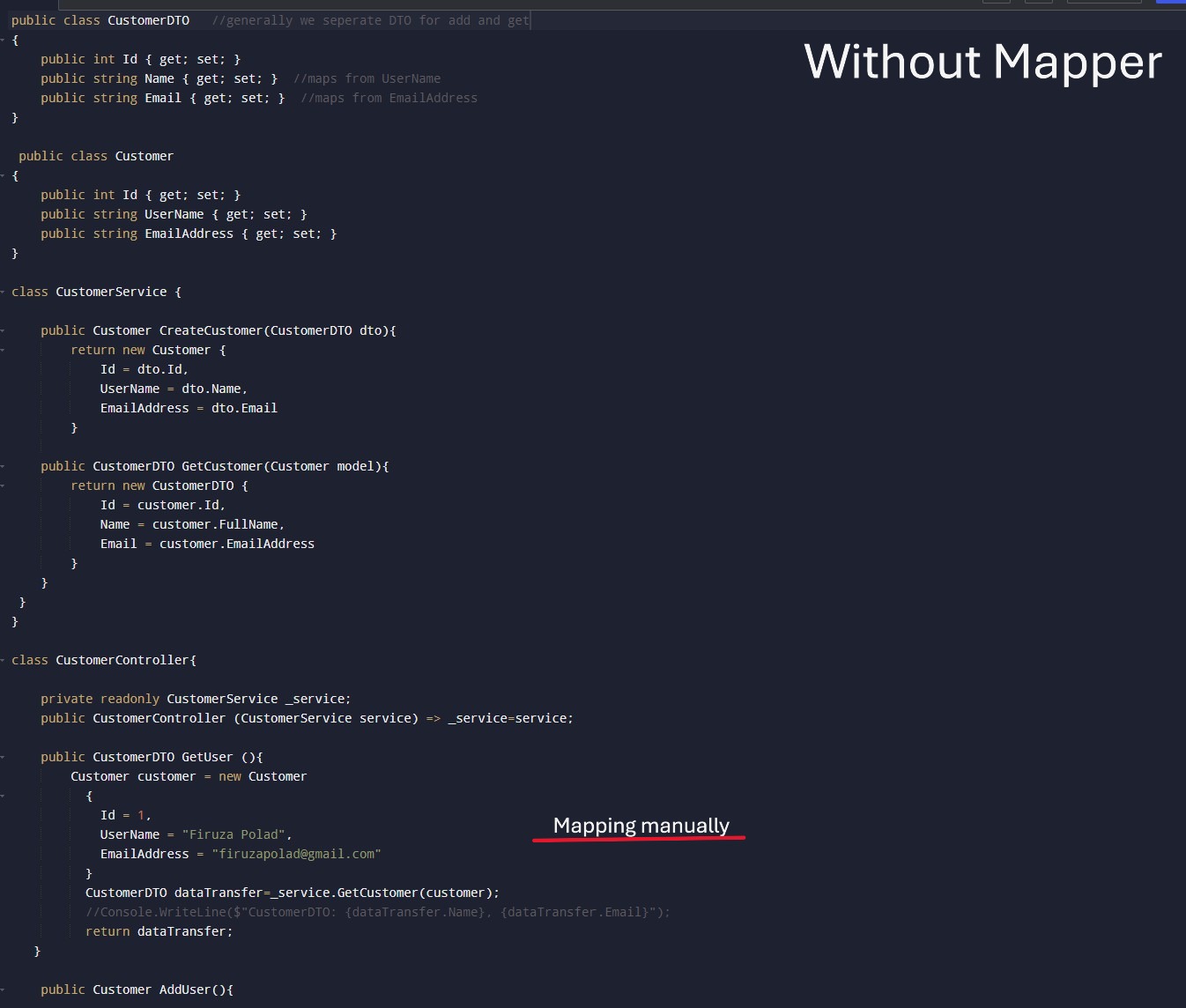
Model Binding
Model Binding is the process of automatically mapping HTTP request data (eg: from input, query string etc), to action method parameters or .NET object. It simplifies development by abstracting the parsing HTTP data and letting to focus on BL. Eg; when a client sends data in a request, the model binding automatically translate data into strongly typed object. There are some resources that model binding use for:
- Query String [FromQuery]: Used when data is sent via URL query string (?name=John). Ideal for simple types and filters, paginations in GET request.
- Route Data [FromRoute]: Used to bind parameters from URL path (/users/5). Useful for ID and values defined in route.
- Form Data [FromForm]: Used for APIs that receive JSON payloads, like POST/PUT. files
- Request Body [FromBody]: Used when raw body content we have, usually JSON and maps it complex types. Only one parameter is allowed per action, means we can not have more than one parameter with FromBody like:
PostUser([FromBody] UserDto user, [FromBody] AddressDto address) Because if we send multiple parameter and during deserialize into objects, the framework wouldn't know how to split them. - Headers [FromHeader]: Used for authentication token, and binds value from Http header.
Default Binding (No Attribute): When no attribute (like above) is used, then frameworks choose the source automatically based on parameter type. So, simple types like int, string, bool, datetime bind from Route, QueryString, Form source.
Eg1:public IActionResult GetUser(int id){//your code}Comes from /GetUser?id=7.
Eg2:public IActionResult GetUser(UserDto user){//your code}except JSON in the body like {"name":{Firuza}}
Custom Model Binding
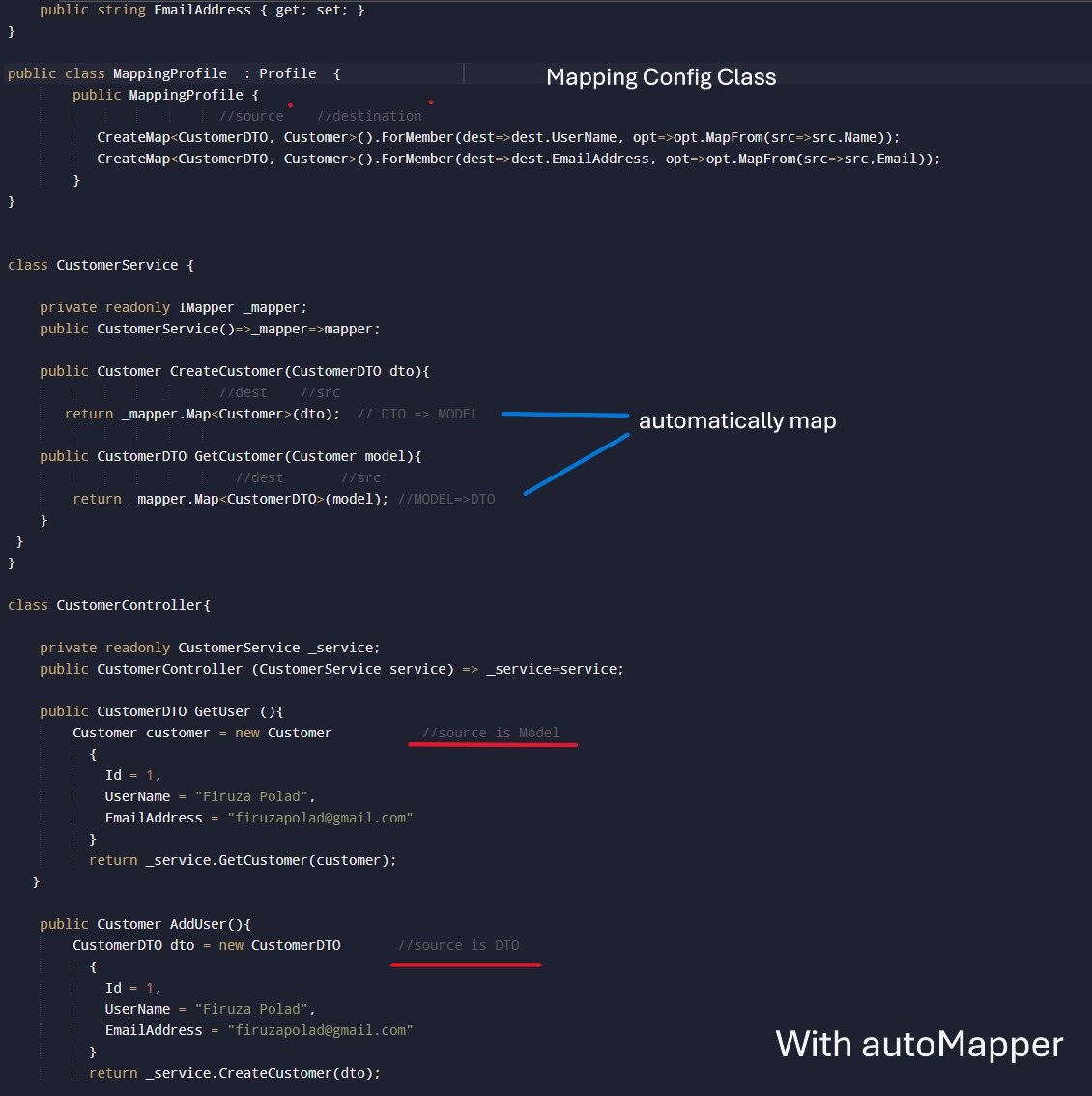
Normally, .NET takes data from the request and automatically fills our object, this process is called model binding. But if the data comes from multiple places like part of URL and part of body or comes from in a weird format, then the default binding may not work, in this situation Custom Model Binding lets us write our own rules for how to handle request data and turn it our object. We use it to bind data from non-standart request format; to combine multiple input sources into one model.
- Create class that implement IModelBinder
- Create ModelBinderProvider
- Decorate model with [ModelBinder] attribute
Eg: Lets say user sends date in format "dd-MM-yyyy" from the query string (like ?dob=26-06-2025), but by default we expects something "yyyy-mm-dd" like 2025-06-26. So if user send 26-06-2025 then model binding fails. To solve it we override the excepted format, we convert it into valid DateTime object, even if system except yyyy-mm-dd, code will work without client needing change their format. (see below image)
Model Validation
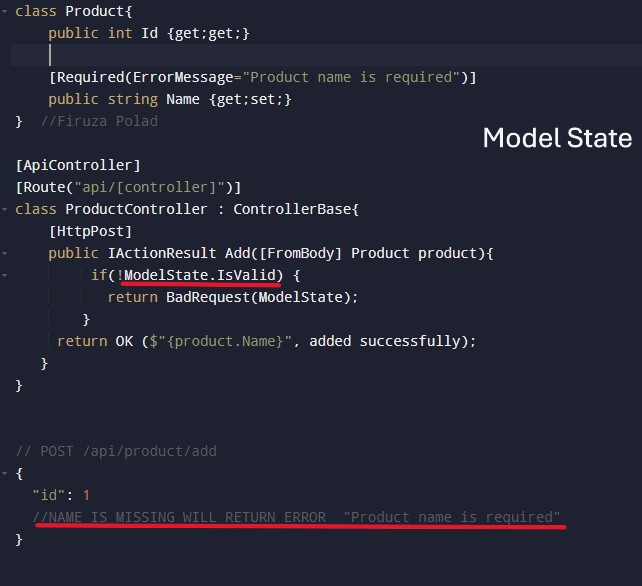
After model binding occurs, to track the validity of model binding, like to check if incoming data is valid according to our model we use it. Used in controller actions and will contain the errors.
Firstly lets see what are validations - it refers to the process used to ensure that data entered by user is correct before it stored. Key concepts & Types of Validation:
- Client-side: it validate data in user's browser before submitting, like using script language. If there is an invalid email format then provide immediate feedback.
- Server-side: it validate data on server, like using c#/Java/Python, and ensure security after form is submitted. Validate more complex BS rules, prevent attacks like SQL injection.
- Database: it enforce data in DB level, like defining constraints in DB. Ensure data consistency, like unique usernames.
Data Annotations: provide validation on client and server-side by using attributes directly on model properties:
- [Required]: Mark a field as required
- [MinLength] & [MaxLength]: [MinLength(4)]
- [StringLength]: [StringLength(7,MinimumLength=4)]
- [Range(4,7)]: get values between range
- [EmailAddress]: validate email format
Data Transfer Objects (DTO)
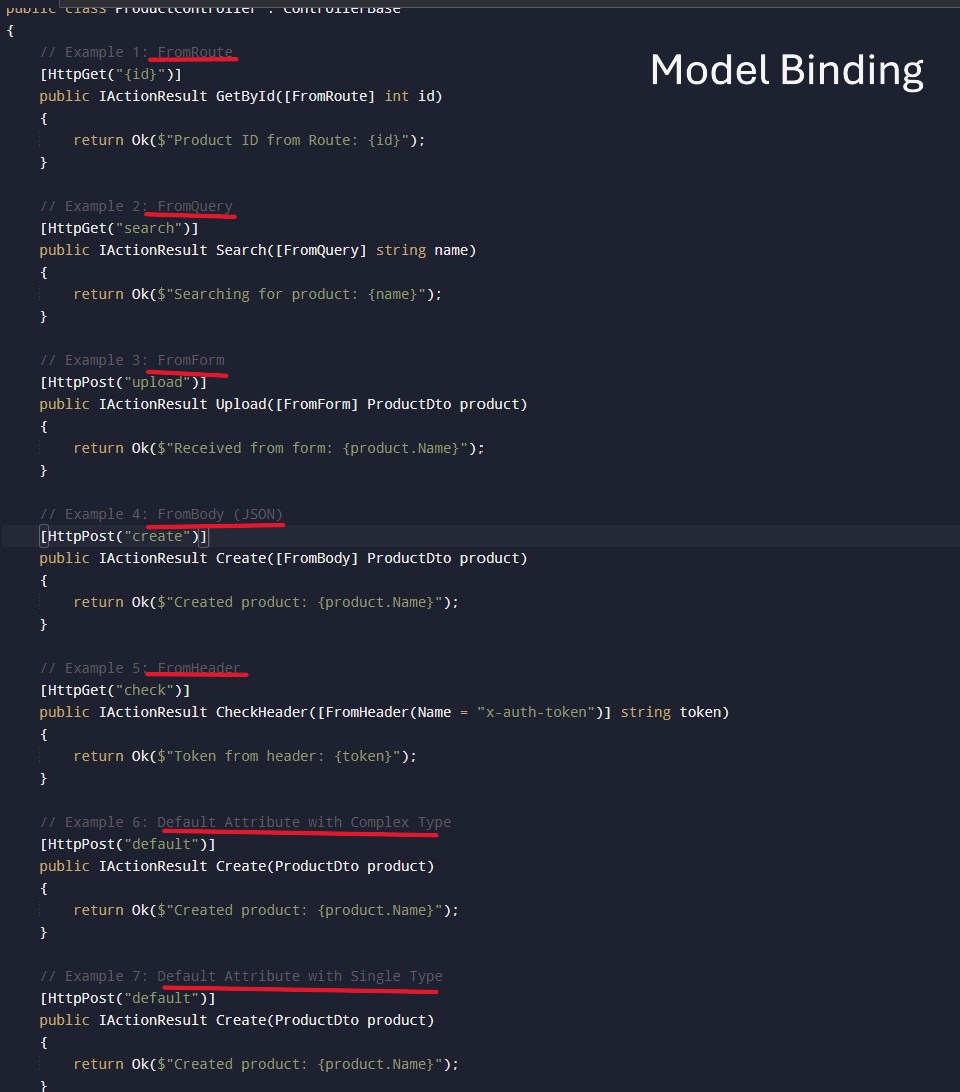
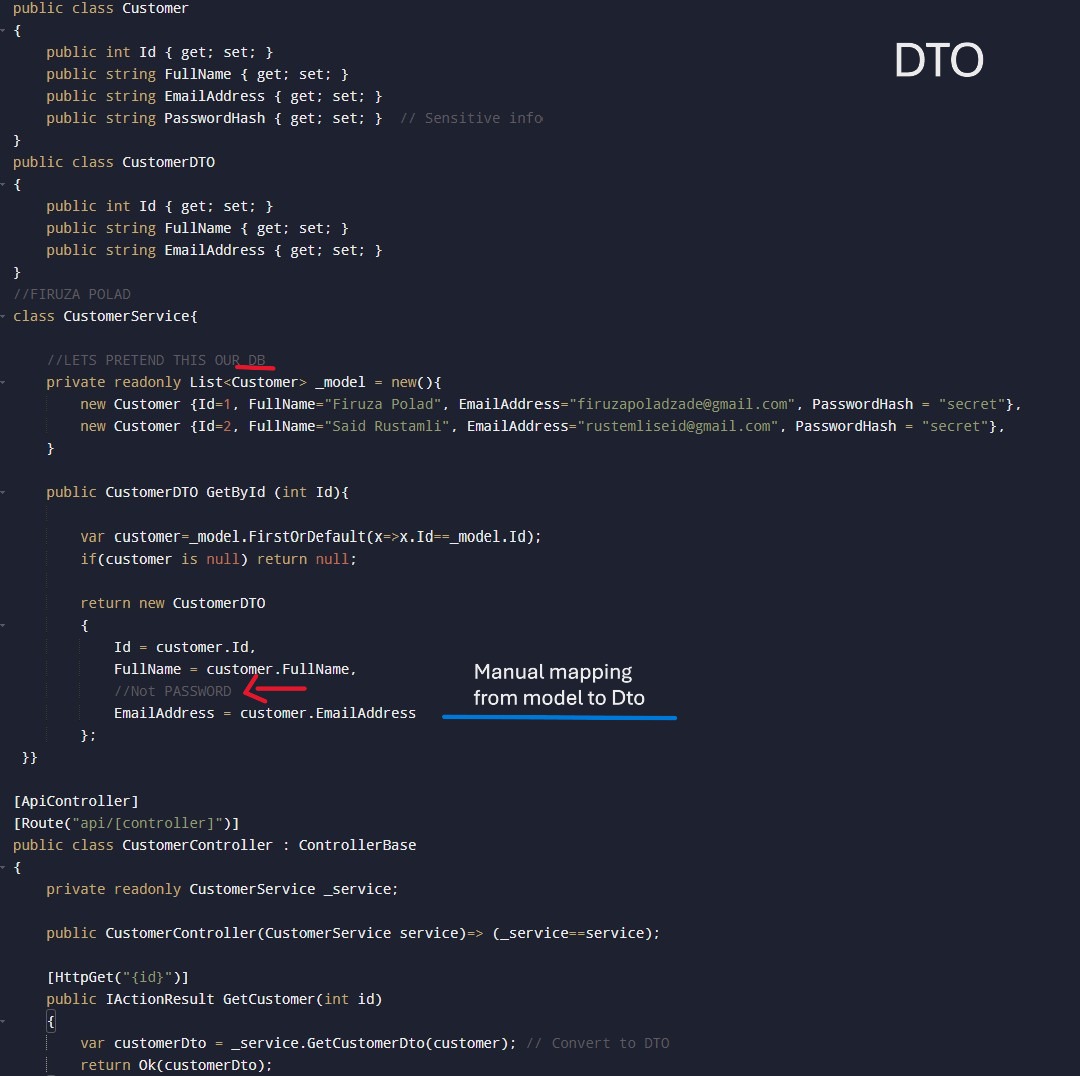
Are used to encapsulate and transfer data between layers of application. Ensure clean separation by reducing unnecessary data from external system like APIs. We create separate DTOs for different operations (e.g., CustomerCreateDTO to exclude passwords, CustomerGetDTO for read-only data).
AutoMapper
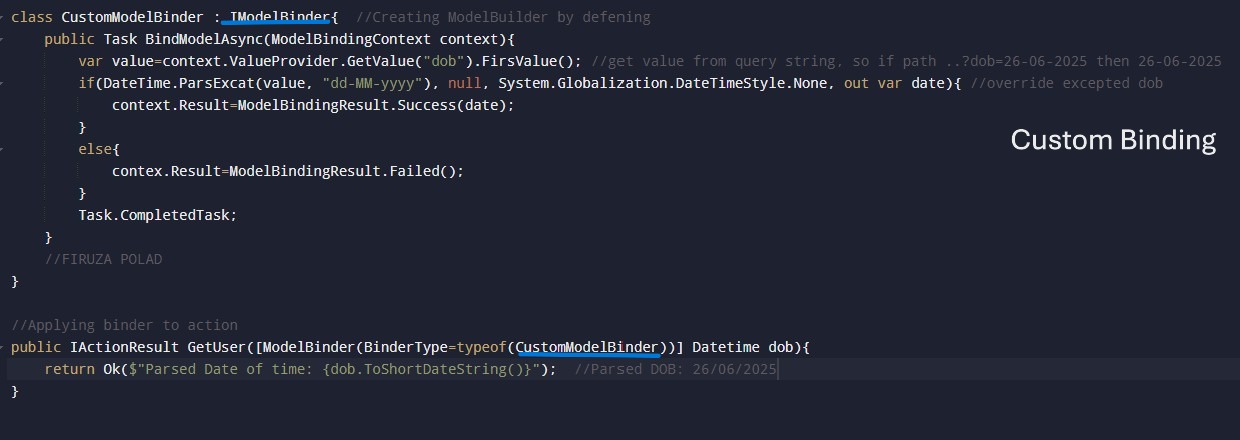
Automapper is an open-source object-to-object mapping library, used to convert object of one type to another type automatically. Instead of manual conversion code between DTO and domain models, it simplifies the conversion between layers.
Map configuration:
- Install NuGet packages (AutoMapper, DependencyInjection)
- Creating AutoMapper Profiles between two models
- Use the AutoMapper instance (IMapper) to perform mapping
- Mapping From DTO to Domain:
var customer = mapper.Map<Customer>(customerDTO); - Mapping from Domain to DTO:
var customerDTO = mapper.Map<CustomerDTO>(Customer); - Update Existing Object:
_mapper.Map(updateDto, Customer);(Updates existing object instead of creating new one).
Below image, without AutoMapper PROBLEM: if the data properties are increased, manual mapping becomes repetitive and messy.